
Categories
Announcements

Colocation Power Updates

All power to full racks will now be provisioned with 20 amp 208 volt three phase service with a three phase PDU. The pricing and power offered will remain the same, but the upgrade from included power will now be a “soft” (billing) change rather than requiring the outlet and PDU to be physically replaced. We feel that this will cover the vast majority of full rack power needs. Upgrading to 30A three phase will still be a “hard” upgrade requiring a a 30 amp circuit and PDU to be installed.

Half racks will remain a 20 amp single phase service due to space restrictions: the three phase PDUs are full rack height while the single phase models are half-height. This allows us to pre-populate racks with the most common power and PDU configurations rather than waiting until the time of order to see if a customer wanted single phase or three phase power to their rack. The net benefit to our customers is faster half rack and full rack availability.

Roller Network provides PDUs and power cords with our colocation service since we use circuits and voltages that are not commonly offered as standard features for most colocation providers in the United States. We provide the infrastructure, you provide what goes in the rack. Roller Network makes it that simple.
Categories
Status

Global Crossing is now Level 3

Roller Network has used Global Crossing as a transit provider for our bandwidth mix over the last year. Earlier this year Global Crossing was purchased by Level 3 and we’ve started to receive notices that as of this month our Global Crossing account will now be a Level 3 account. We don’t expect any changes that will impact us operationally (although we’ll be watching closely), and we will be referring to Level 3 as one of our transit providers from this point forward.

Categories
Changes Status

Internal Server Maintenance this Weekend

This weekend we’re going to be building a new server for the internal system that runs Asterisk for our office and the Request Tracker ticketing system that handles email for role accounts (like support and billing). Although the current server is still faithfully running with its original Athlon with 786MB of RAM, it’s starting to show its age (RT runs exceptionally slow) and the time has come to give it a forklift upgrade. As such, messages set to support, billing, and sales will be monitored manually (we’re using Mail Mirror on our domain) but they won’t get the usual auto response until after the new server is back online. Our office will also be unavailable by phone during the upgrade, although we rarely receive any calls on the weekends.

The new server we’re building for this upgrade will be an Intel Xeon X3430 with 8GB of DDR3 RAM on a Supermicro X8SIL-F motherboard in a 4U case instead of a 1U since we need to install multiple cards for Asterisk and the drive array controller.

UPDATE: We’ve finished restoring all of the major services and we’re working on the rest of the clean up.

Categories
Changes

New Feature: Primary DNS Update Multiple Zones

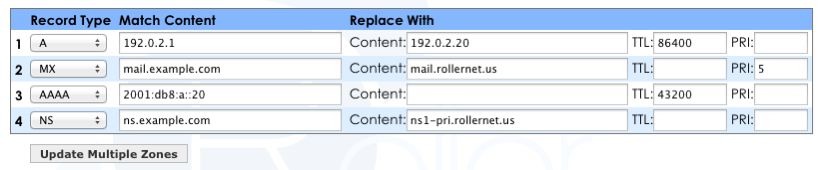
We’ve added a multi-domain tool to Primary DNS that allows updates for simple record types to be easily changed for multiple zones. For example, this feature can be used as a “find and replace” to update an IP addresses or its TTL wherever a match is found (within selected domains). Record types supported are: A, AAAA, MX, NS, TXT, SPF, CNAME, and PTR. To access this feature click on the “Update Multiple Zones” button on the Primary DNS page in the account control center.

Primary DNS multiple zone update examples.

Categories
Changes

New Options for Outbound Mail

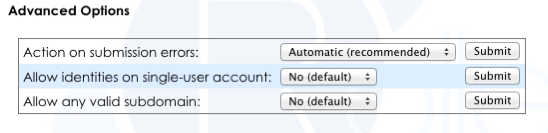
We’ve added two new advanced options for Outbound Mail accounts:

  • Allow identities on single-user account
  • Allow any valid subdomain

These advanced options allow  some of the restrictions on single-user and any-user type accounts to be modified. The first one allows the “left hand side” to vary on single-user accounts (such as for identities). The second one allows matching subdomains of the configured domain to be accepted as valid. The default setting for these options is disabled, which preserves the original behavior of the account types.

New identity options for Outbound Mail accounts.